

Crypto can lose all of its value and is not protected by FDIC or SIPC insurance. This is education, not investment advice.
Chainalysis counted about 158,000 thefts from personal crypto wallets in 2025, and in nearly all of them no company could step in and return the money. That is the basic trade of a non-custodial crypto wallet: you hold the keys, so nobody can freeze your coins, and nobody can rescue them either. This guide covers how self-custody works, how to tell whether an app really is non-custodial, how to choose and set one up safely, and what changes for your US taxes.
BLOCKEDRelated consumer alert, Nov 9
FinCEN, Fed pull crypto Travel Rule proposal to seek new public inputRun the numbers
Key takeaways
- In a non-custodial wallet, your recovery phrase is the account. If you lose it, nobody can restore it for you, and if someone steals it, nobody can reverse the theft.
- Some brand names cover two different products: a Coinbase.com account is custodial, while the Coinbase Wallet app is self-custody.
- In 2025, most self-custody losses came from phishing, malicious software and scams. Broken hardware played little part.
- A self-custody wallet doesn’t ask for your ID, but your transactions are public on the blockchain. It is private only in a limited sense.
- Self-custody wallets don’t send you a Form 1099-DA, so keeping cost-basis records falls to you. The CLARITY Act‘s “Keep Your Coins” protection was still not law as of November 2026.
Before you move your crypto
If you lose your recovery phrase, or give it to anyone, you can lose every coin in the wallet for good. Crypto can also lose all its value, and coins in any wallet have no FDIC or SIPC insurance.
In this guide: what a non-custodial wallet is, how keys and recovery phrases work, custodial vs non-custodial, the 4-question custody test, popular wallets sorted by custody model, what you can do with one (and how private it really is), how to choose one, wallet types, how people lose crypto, the setup checklist, lost-phrase recovery, taxes, US law, and who should wait.
Most-read sections: Is my wallet custodial or non-custodial? · Setting one up safely · Taxes and Form 1099-DA
Fact-checked
We checked these key facts against the sources named, on November 12, 2026:
- It is private only in a limited sense. – Self-custody wallets don’t send you a Form 1099-DA, so keeping cost-basis records falls to you (source: irs.gov)
- USDC sent on Base is not the same transfer as USDC sent on Ethereum or BNB Chain, and choosing the wrong network can strand the funds. :::tip Send a test first Send a small amount first (source: developers.circle.com)
What is a non-custodial crypto wallet?
A non-custodial crypto wallet (also called a self-custody, self-custodial or non-custodial digital wallet) is an app or device where you alone control the private keys that authorize spending. No company can move, freeze or recover the funds, so all the control and all the responsibility sit with you.
The wallet doesn’t actually hold coins. Bitcoin, ether and other tokens live as entries on a public blockchain. The wallet stores the keys that prove which entries you can spend. If the app disappears tomorrow, the coins stay on the blockchain, and any compatible wallet that has your keys can reach them.
Self-custody changes four things in practice:
- No password reset. No support team can verify your identity and let you back in.
- No freezes. No company can block a withdrawal or lock your account.
- No reversals. A payment sent to the wrong address, or to a scammer, stays sent.
- No one to call. If something goes wrong, there’s no complaint desk inside the wallet company that can fix it.
How it works: private key, address and recovery phrase
A self-custody wallet runs on three linked pieces: a private key that signs transactions, a public address that others send funds to, and a recovery phrase that can recreate every key. Lose the device and you still have the phrase. Lose the phrase and the keys go with it.
Private key vs public address
A bank account is a useful comparison. Your public address works like an account number: you can share it so people can pay you. Your private key works like your signature and PIN rolled into one: whoever holds it can spend the funds.
The comparison stops working at one point: there’s no bank behind it. Under the Electronic Fund Transfer Act, a bank customer can dispute an unauthorized debit card transfer with the institution that issued the card. A self-hosted wallet has no issuer, so the network will accept a valid, protocol-compliant transaction signed by the right key, including one signed by a thief.
The recovery (seed) phrase
Most wallets use the BIP-39 standard, though not all do. When you create a wallet, it shows you 12, 18 or 24 words drawn from a fixed list of 2,048. Those words mathematically generate all your private keys and addresses, across every account and every supported network in that wallet.
This has two consequences. One phrase restores everything, often in a different brand’s app, because the standard is shared. And anyone who sees your phrase can restore your wallet on their own device without you noticing. Some wallets also let you add an optional passphrase (often called a “25th word”) for an extra layer, but if you forget it, the funds behind it are gone too.
Losing your phone is survivable. You install the wallet again, type in the phrase and get the same balances back. Losing the phrase with no logged-in device is usually the end of the money.
What actually happens when you send crypto
- You enter an address and an amount, and pick a network.
- The wallet builds a transaction and signs it with your private key on your device. The key itself never travels.
- The signed transaction goes out to the network, and you pay a network fee (called “gas” on Ethereum).
- Validators or miners add it to a block. Once confirmed, it can’t be undone by you, the wallet maker or anyone else.
Custodial vs non-custodial: side-by-side
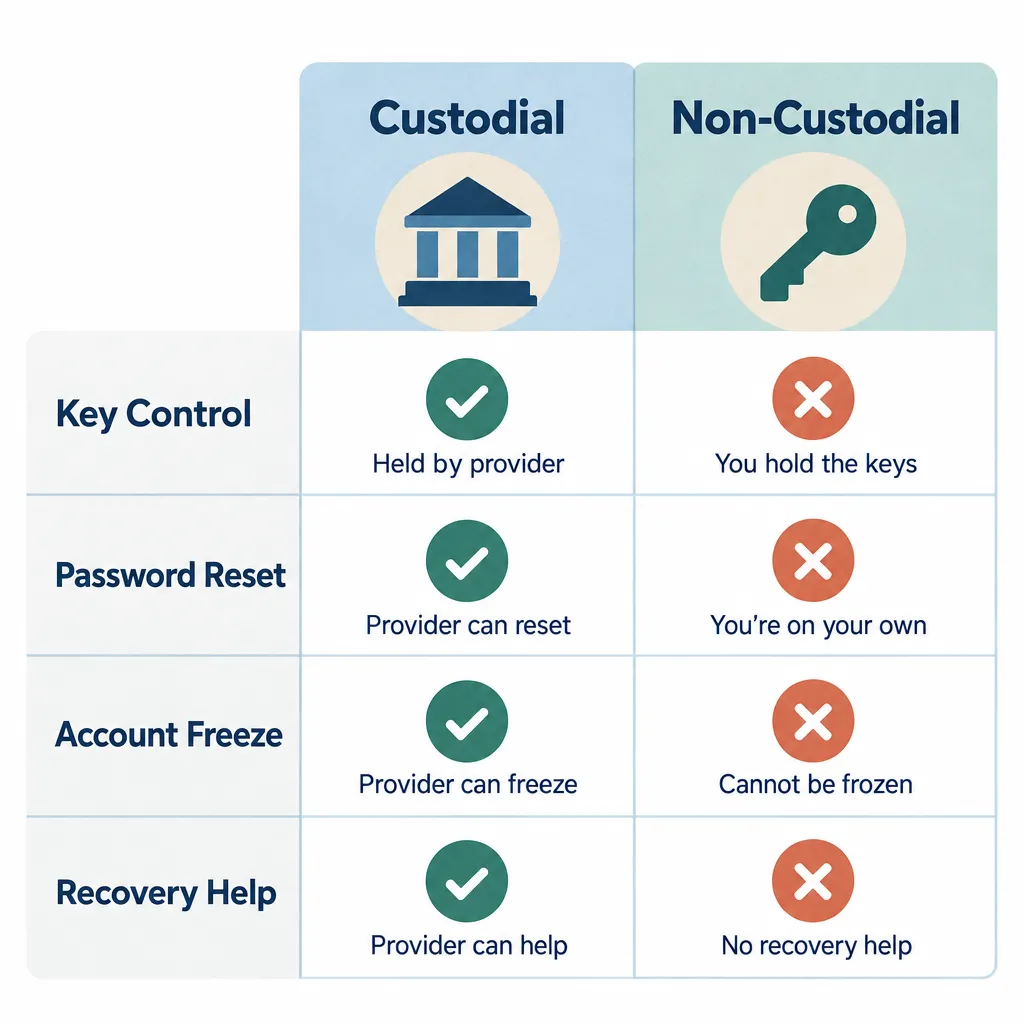
Neither model is better for everyone. Custodial accounts trade control for convenience and a support desk. Non-custodial wallets trade convenience for control: they remove the risk of a company failing or freezing your money, and add the risk of your own mistakes.
| Feature | Custodial (exchange account) | Non-custodial (self-custody) |
|---|---|---|
| Who holds private keys | The company | You |
| Forgot your password | Company can reset after ID checks | Only your recovery phrase helps |
| Can funds be frozen | Yes, by the company or legal order | Not by the wallet maker |
| ID checks (KYC) | Required to hold and trade | Usually none to create a wallet |
| Transaction privacy | Company sees everything | Public on the blockchain |
| If the company fails | Funds can be stuck in bankruptcy | Coins stay on-chain, under your keys |
| FDIC or SIPC cover for crypto | No | No |
| Form 1099-DA | Yes, the broker reports sales | No |
| Main risk | Company failure, hacks, freezes | Your mistakes, phishing, malware |
| Access to dapps and DeFi | Limited | Direct |
When custodial makes more sense
Custodial accounts suit small balances, people who trade often and buy with dollars, and anyone who knows they lose passwords. A regulated US exchange also gives you a paper trail, tax forms and a company you can complain about to the Consumer Financial Protection Bureau or your state regulator.
The weakness is bankruptcy risk. When Celsius and FTX failed in 2022, customers were frozen out and waited years in court proceedings. Bitcoin users have a saying for this: “not your keys, not your coins.” Readers often ask whether moving coins off Coinbase protects them if Coinbase is hacked or goes under. It removes that particular risk, but you take on every risk of handling the keys yourself.
When self-custody makes more sense
Self-custody makes sense for long-term holdings large enough to matter, for anyone using decentralized apps, and for people who can keep a written backup secure for years. It also suits anyone who can’t risk a company freezing their access.
The “both” approach
Many experienced users split their money. Savings sit in self-custody, often on a hardware device (our guide to what a cold wallet is covers this in depth), while a small trading balance stays on an exchange. A third, small “spending” wallet is the one they connect to new websites. That way, one mistake can’t empty everything.
Is my wallet custodial or non-custodial? A 4-question test
Marketing words like “secure,” “your wallet” and “Web3” don’t tell you who holds the keys. These four questions do, and you can apply them to any app:
- Were you shown a recovery phrase (or set up a key or passkey that only you control)? If not, check the app’s design and terms, since some wallets manage keys without showing a phrase and custody depends on how the app actually works.
- Can customer support reset your access? If they can let you back in after an ID check, it’s custodial.
- Did you need to upload ID before you could hold funds? Identity checks are standard for custodial brokers. Most self-custody wallets don’t ask for them.
- Can the company freeze or reverse a withdrawal? If yes, it controls the keys.
If all four answers point to self-custody, the app is non-custodial. If even one points the other way, treat it as custodial.
Run the test first
If a company can reset your access, it’s custodial, whatever its marketing says. Check before you move any money into an app.
Popular wallets sorted correctly
This table sorts well-known names by custody model. It doesn’t rank them. Being non-custodial says nothing about whether a wallet is safe for you: that depends on how you use it, where you got it and how you back it up.
| Wallet / app | Type | Custody model | Main blockchains | Note |
|---|---|---|---|---|
| Coinbase.com account | Exchange app and website | Custodial | Many | Coinbase holds the keys and sends 1099-DA |
| Coinbase Wallet (called Base app July 2025 to Sept 2026) | Mobile app, extension | Self-custody | 11 networks incl. Bitcoin, Ethereum, Base, Solana | Separate app from the Coinbase.com account |
| Crypto.com App | Exchange app | Custodial | Many | Company holds the keys |
| Crypto.com Onchain | Mobile app, extension | Non-custodial | Multichain | Separate product from the Crypto.com App |
| Binance account | Exchange | Custodial | Many | Company holds the keys |
| Trust Wallet | Mobile app, extension | Non-custodial | Multichain | Owned by Binance, extension breached Dec 2025 |
| Exodus | Desktop, mobile | Non-custodial | Multichain incl. Bitcoin | Built-in swaps carry a provider spread |
| MetaMask | Extension, mobile | Non-custodial | Ethereum and EVM chains, Solana | Most widely used Ethereum wallet |
| Phantom | Mobile, extension | Non-custodial | Solana, Ethereum, Base, Bitcoin | Started as a Solana wallet |
| Rabby | Extension, desktop, mobile | Non-custodial | EVM chains | Shows transaction previews before you sign |
| Electrum | Desktop | Non-custodial | Bitcoin only | Long-running, works with hardware wallets |
| Sparrow | Desktop | Non-custodial | Bitcoin only | Strong multisig and hardware support |
| BlueWallet | Mobile | Non-custodial | Bitcoin | Simple Bitcoin mobile wallet |
| Bitcoin Core | Desktop full node | Non-custodial | Bitcoin only | Checks the whole blockchain itself |
| Phoenix, Breez | Mobile | Non-custodial | Bitcoin Lightning | Self-custodial Lightning payments |
| Ledger | Hardware | Non-custodial | Multichain | Optional paid phrase backup (Ledger Recover) |
| Trezor | Hardware | Non-custodial | Multichain | Open-source firmware |
| Keystone | Hardware | Non-custodial | Multichain | Air-gapped, signs through QR codes |
| Zengo | Mobile MPC wallet | Non-custodial (MPC) | Multichain | No seed phrase, recovery relies on its servers |
Is Coinbase a non-custodial wallet?
The main Coinbase.com account is custodial: Coinbase holds the keys, can freeze withdrawals and sends you tax forms. Coinbase Wallet is a separate self-custody app. In July 2025 Coinbase renamed it the “Base app.” On September 10, 2026 it announced a return to the Coinbase Wallet name, with the app now pitched as a multichain trading hub. Base now refers only to Coinbase’s blockchain.
So the Coinbase Wallet app isn’t the same as your Coinbase account, even though you can link them. In the wallet app, Coinbase can’t move or freeze your funds, and it can’t recover a lost recovery phrase. The app offers several kinds of account: classic recovery-phrase wallets, accounts tied to email or social login, and passkey smart wallets. Each recovers differently, so check which one you set up.
Did you know?
Coinbase’s self-custody app has had three names in about 14 months: Coinbase Wallet, then “Base app” in July 2025, then Coinbase Wallet again from September 2026, as reported by The Block.
Is Trust Wallet non-custodial?
Yes. Trust Wallet shows you a recovery phrase and can’t reach your funds, even though Binance owns it. Being non-custodial didn’t protect browser-extension users in December 2025, though. That case is covered in the losses section below.
Is Exodus non-custodial?
Yes. Exodus generates the keys on your device and gives you a recovery phrase. Its built-in swap feature uses third-party providers, and the price you pay includes their spread, so swapping inside the wallet can cost more than it looks.
What can you do with a non-custodial wallet?
A non-custodial wallet lets you do more than store coins: you can connect directly to decentralized apps, stake, swap, set your own fees and take your keys to another app. Every one of these actions is signed by you alone, so every one of them is also final.
| Use | What it means | Watch out for |
|---|---|---|
| Dapps and DeFi | Connect to lending, trading and NFT sites by signing in with your wallet | Every connection can ask for token approvals |
| Self-custodial staking | Delegate coins to a validator while keeping your keys (for example, native SOL staking in Phantom) | Unbonding waits, validator risk, liquid staking token risk |
| In-wallet swaps | Trade one token for another without an exchange account | Provider spread and service fees on top of network fees |
| NFTs and tokens | Hold and send NFTs and tokens on supported networks | Fake “airdropped” tokens that lead to phishing sites |
| Fee control | Choose a faster or cheaper fee, replace a stuck transaction, and (in some EVM wallets) set the nonce manually | Setting the fee too low can leave a payment pending for hours |
| Bitcoin coin control | Wallets such as Sparrow and Electrum let you pick which coins to spend | More choices mean more room for mistakes |
| Portability | Restore the same phrase in another compatible app | Different apps may use different derivation paths, so balances can look missing |
Swaps and staking: where the costs hide
The network fee is only part of what a swap costs. Wallets that route trades through aggregators or market makers usually add a spread or a service fee, and both show up in the quoted rate, not as a separate line. Comparing the quote with the market price on a public price tracker before you confirm shows you the real cost.
Staking from a self-custody wallet keeps the coins under your keys, but it isn’t risk-free income. Rewards vary by network and change over time. Native staking can lock coins for a waiting period when you unstake, and liquid staking tokens add smart-contract risk. Rewards also count as income for US tax purposes when you gain control of them.
Privacy: no KYC, but not anonymous
Creating a self-custody wallet usually needs no name or ID, but that doesn’t make it anonymous. Most blockchains are public ledgers. Anyone can paste your address into a block explorer such as Etherscan or mempool.space and see its balance and every transaction it has made.
The link to your identity usually comes from the edges. When you withdraw from a US exchange, the exchange has your verified identity and records the address you sent to. Blockchain analytics firms, law enforcement and the IRS can then follow funds from that point. Reusing one address for everything, or posting it publicly, makes the trail even easier to read. Self-custody gives you control. It gives you only partial privacy.
How to choose a non-custodial wallet
The right wallet is the one that supports your blockchain, has a clean and openly disclosed security record, and recovers in a way you can manage for years. Features matter less than these basics, and no single wallet is best for every use.
The criteria below come from published security research, wallet makers’ own documentation and the incident record. The first three can rule a wallet out on their own. The rest decide between wallets that pass.
| Criterion | Why it matters | What to check |
|---|---|---|
| Chains supported | A wallet can’t show or send coins on a network it doesn’t support | The exact networks you use, including layer-2s |
| Open-source code | Outside researchers can inspect how keys are handled | Public code repository, reproducible builds for Bitcoin wallets |
| Security audits and incident history | Shows how the company found problems and how it disclosed them | Published audits, past breaches and how victims were treated |
| Hardware wallet support | Lets you move savings to a cold device later without switching apps | Ledger, Trezor or Keystone compatibility |
| Transaction previews and approval warnings | Catches drainers before you sign | Simulated balance changes, warnings on unlimited approvals |
| Recovery model | Decides what you depend on if a device is lost | Phrase, passkey, MPC server share or social recovery |
| Built-in swap fees | In-app trading can cost more than it looks | Spread and service fee shown in the quote |
Matching wallets to how you use crypto
| Use case | What matters most | Wallets that fit the criteria |
|---|---|---|
| Bitcoin-only long-term savings | Open source, hardware support, coin control | Sparrow or Electrum paired with a Trezor, Ledger or Keystone |
| Ethereum DeFi | Transaction previews, approval warnings, EVM chain coverage | Rabby or MetaMask, with a separate small “hot” wallet for new sites |
| Solana | Native Solana support and staking | Phantom |
| Beginners with small balances | Simple backup, clear recovery, mobile app | BlueWallet for Bitcoin, Coinbase Wallet or Exodus for several chains |
| Large holdings | No single point of failure, offline signing | Hardware wallet, ideally in a 2-of-3 multisig with Sparrow |
The honest counter-argument: for a beginner with a few hundred dollars, a regulated exchange account may be safer than any wallet on this list, because a password reset is possible there. The next sections explain why.
Types of non-custodial wallets: hot, cold and in-between
Self-custody wallets come in three groups. Hot wallets keep keys on a device that’s online. Cold wallets keep keys on a device that signs offline. Newer smart, multisig and MPC wallets spread control across several keys or parties.
Software (hot) wallets
Mobile apps (Trust Wallet, Phantom, BlueWallet), desktop apps (Exodus, Electrum, Sparrow) and browser extensions (MetaMask, Rabby) are free and quick to use. Their weakness is that the key sits on a device that also runs your browser, email and every app you’ve installed. Browser extensions sit right next to the websites that try to trick you, which is a particular concern.
Hardware (cold) wallets
Ledger, Trezor and Keystone devices keep the private key on the device and sign transactions there, though the security design varies by model: Ledger uses a Secure Element, while Keystone signs in an air-gapped way over QR codes. Despite what some guides claim, they don’t connect directly to the internet. They talk to a phone or computer over USB, Bluetooth or QR codes, and only the signed transaction leaves the device.
A hardware wallet stops malware from copying your key. It can’t stop you approving a bad transaction or typing your phrase into a fake website. So do you need one for a few hundred dollars? Usually not. Most hardware wallets cost more than $50, and for a small balance, a well-backed-up phone wallet with careful habits is a reasonable choice.
Paper wallets (a key printed on paper) are a legacy option. They usually hold a single address, they expose the key to whatever computer and printer made them, and spending part of the balance the wrong way can send the change to an address you can’t reach. A recovery phrase written on paper or metal is a different thing and is still standard practice.
Multisig and smart/passkey wallets: the recovery trade-off
These wallets aim to remove the single point of failure, and each does it a different way:
- Multisig (for example, a 2-of-3 setup in Sparrow) needs signatures from two of three keys. Losing one key doesn’t lose the funds, but the setup is more complex and you must back up the wallet configuration as well as the keys.
- Passkey smart wallets, such as the smart wallet in Coinbase Wallet, replace the 12 words with a passkey stored in your phone’s or password manager’s keychain.
- MPC or “keyless” wallets, such as Zengo, split the key into shares held on your device and the provider’s servers.
- Social recovery lets trusted contacts approve a reset.
The trade-off is dependence. Recovery may rely on a company’s servers, a cloud keychain or other people. These options are still self-custody, but you should know who or what your recovery depends on.
How people actually lose crypto in self-custody (2025 data)
Most people who lose self-custodied crypto are tricked into signing or sharing something. Few lose it because a wallet’s encryption broke. The 2025 numbers show more victims, each losing a smaller amount on average, plus a very large US scam problem.
| Measure | Figure | Period | Source |
|---|---|---|---|
| Total crypto stolen in hacks and theft | About $3.4 billion | 2025 | Chainalysis |
| Taken by North Korea-linked attackers | More than $2 billion | 2025 | Chainalysis |
| Personal-wallet compromise incidents | About 158,000 | 2025 | Chainalysis |
| Unique victims of wallet compromises | At least 80,000 | 2025 | Chainalysis |
| Value stolen from personal wallets | $713 million (down from $1.5 billion) | 2025 vs 2024 | Chainalysis |
| Personal wallets’ share of all value stolen | About 20% (44% in 2024) | 2025 vs 2024 | Chainalysis |
| US crypto-related losses reported | About $11.37 billion, 181,565 complaints | 2025 | FBI IC3 |
| Crypto investment fraud losses | About $7.2 billion | 2025 | FBI IC3 |
| Crypto ATM complaints and losses | 13,460 complaints, about $389 million | 2025 | FBI IC3 |
The FBI’s Internet Crime Complaint Center (IC3) recorded $20.877 billion in total reported losses across more than 1 million complaints in 2025, according to its annual report released in April 2026. Crypto accounted for more than half. Crypto-related losses rose 22% from 2024, and coverage of the report singled out older Americans as the hardest-hit group. The personal-wallet share in the Chainalysis data fell partly because the $1.5 billion Bybit exchange hack inflated the total. Leave Bybit out and personal wallets made up about 37% of stolen value. Crypto ATM fraud often pushes victims to deposit cash into a scammer’s wallet, a pattern explained in our guide to how crypto ATMs work and what they really cost.
Did you know?
According to Chainalysis, personal-wallet theft incidents rose to about 158,000 in 2025, yet the total stolen from individuals fell to $713 million from $1.5 billion in 2024. More people were hit, but for smaller amounts each.
Phishing and fake support asking for your phrase
The most common trick is a fake site or fake “support agent” asking for your 12 or 24 words. These often appear as search ads, direct messages after you post a question online, or pop-ups about a “sync” or “validation” problem.
Readers often ask some version of this: someone from support asked for my 12 words to fix a sync issue, and I gave them. Yes, that’s a scam. Create a new wallet on a clean device straight away and move whatever is left into it, because the old phrase is compromised for good.
Nobody legitimate asks for your phrase
No real wallet company, exchange or support agent will ever ask for your recovery phrase. Anyone who asks is trying to steal from you.
Malicious browser extensions and token approvals
“My wallet got drained and I never shared my seed. How?” is one of the most common questions, and there are four usual answers:
- Token approvals. You signed a permission that let a contract spend your tokens.
- Clipboard malware. Malicious software swapped the address you pasted for the thief’s.
- Address poisoning. You copied a look-alike address from your own transaction history.
- A compromised wallet update. The wallet software itself was changed.
The Trust Wallet case is a real example of the last one. On December 24, 2025, a malicious build of its browser extension, version 2.68, appeared on the Chrome Web Store with code disguised as an analytics module. It was published outside the company’s normal release process. Trust Wallet’s incident post says the attacker got in through exposed developer secrets, including a Chrome Web Store API key. The company identified 2,520 affected wallet addresses and about $8.5 million in impacted assets, while early press reports put the loss near $7 million. Mobile app users were not affected. Trust Wallet said it would reimburse victims voluntarily, received more than 5,000 claims and flagged many of them as duplicates or false. As of its mid-2026 update, it described verification as ongoing.
The lesson is that non-custodial doesn’t mean immune. Users did nothing wrong in that case, and any compensation depended on the company’s goodwill, not on any legal duty.
“Pig-butchering” investment scams that start after you self-custody
Investment fraud was the FBI’s largest crypto loss category in 2025, at about $7.2 billion, and it often starts with a friendly stranger online. After weeks of chat, they tell you to “move your crypto to a private wallet” and then connect it to a fake trading platform. Being told to self-custody by someone you met online is a red flag in itself.
Physical threats
“Wrench attacks” are robberies or home invasions aimed at people known to hold crypto. Not discussing your holdings in public, and keeping larger sums in multisig, both reduce this risk.
Setting one up safely: a step-by-step checklist
A safe setup takes about 30 to 60 minutes. Most of that time goes on backing up the recovery phrase and testing the restore, not on installing the app.
What you need:
- A phone or computer that is up to date and free of pirated software.
- The wallet maker’s official website address, typed in directly. Don’t click a search ad.
- Paper and pen, or a metal backup plate.
- A private place where no camera can see your screen.
- A small amount of crypto for a test transfer.
Steps:
- Download the wallet only from the maker’s official site or the official app store listing, and check the developer name.
- Create a new wallet. Never import a phrase someone else gave you.
- Write the recovery phrase down by hand, in order, and check the spelling against the screen.
- Complete the app’s backup check, then restore the wallet on a spare device or after reinstalling.
- Set a strong app PIN or passcode, and turn on biometrics if the app offers it.
- Send a small test amount, confirm it arrives, then send it back out to confirm you can spend.
- Move the rest only after the test succeeds.
- Every few months, review and revoke token approvals you no longer use.
Expected result: you have a wallet you’ve proven you can restore from paper, a confirmed incoming and outgoing transfer, and a backup that’s stored offline.
Backing up the recovery phrase
Store the phrase on paper or metal, in at least one safe place you control, such as a home safe. Many people keep a second copy in a separate location.
Is a photo in iCloud okay? No. Cloud accounts, notes apps and photo libraries get phished and synced to devices you don’t watch. Typing the phrase anywhere digital creates a copy that someone else can find.
Do a test restore before you move real money
The restore test is the step most people skip, and it’s the only one that proves the backup works. A missing word or a swapped order shows up now, while the account is empty, instead of years later.
Moving funds off an exchange: address and network checks
Copy the receiving address from your wallet, then check the first and last several characters on both screens. Pick the same network on both sides. USDC sent on Base is not the same transfer as USDC sent on Ethereum or BNB Chain, and choosing the wrong network can strand the funds.
Send a test first
Send a small amount first. Before you send the rest, check both the address and the network (for example, Ethereum vs Base vs BNB Chain).
Reviewing and revoking token approvals
A token approval is a standing permission. It lets a smart contract move a token from your wallet until you cancel it, and many dapps ask for “unlimited” amounts by default. Wallets such as Rabby show your active approvals, and block explorers such as Etherscan have approval-checker pages. Revoking one costs a small network fee. Do it for any site you no longer use, and right away if you suspect you signed something malicious.
Common mistakes
- Storing the phrase in email, screenshots or a password manager that’s shared with others.
- Connecting a main savings wallet to new or unfamiliar websites.
- Approving “unlimited” token spending without reading the request.
- Not keeping a little of the network’s own coin for fees, which leaves tokens stuck.
- Leaving no instructions for heirs. If nobody else can find your phrase, your family can’t get the funds after your death. Write down where the backup is kept and include that in your estate documents.
Lost your phone, password or recovery phrase? What’s possible
Recovery depends on one thing: whether you still have the phrase or a device that’s still logged in. If you have either, you can usually save the funds.
| Situation | Recoverable? | What to do |
|---|---|---|
| Phone or device lost or broken | Yes | Install the wallet on a new device and restore with your phrase |
| App password or PIN forgotten | Yes | Reinstall and restore from the phrase |
| Phrase lost, still logged in | Yes, if you act now | Create a new wallet and move all funds into it |
| Phrase lost and locked out | Generally no | Funds are effectively gone |
| Phrase seen by someone else | Only what’s left | Move remaining funds to a new wallet immediately |
| Phrase restored but balance shows zero | Often yes | Check the network and the derivation path the original app used |
Lost your phrase but still logged in
- Don’t uninstall the app or log out.
- Create a brand-new wallet and back up its new phrase properly.
- Send a small test amount from the old wallet to the new one.
- Move everything else, keeping enough for network fees.
- Revoke old approvals and stop using the old wallet.
Be wary of paid “crypto recovery services.” The FBI has repeatedly warned that fake recovery firms target people who have already lost money, charging upfront fees for results they can’t deliver. No one can reverse a blockchain transaction or guess a lost 12-word phrase. Report theft to the FBI’s IC3 at ic3.gov and to the FTC at ReportFraud.ftc.gov. If a US exchange or crypto company was involved, you can also file with the CFPB’s complaint portal.
Taxes: what changes when you self-custody (1099-DA)
The IRS treats crypto as property under IRS Notice 2014-21, and that doesn’t change when you move coins into your own wallet. What changes is the paperwork. No company reports your self-custody activity to you, so you have to keep your own records.
Who files Form 1099-DA, and who doesn’t
Form 1099-DA is filed by brokers, which can include trading platforms, hosted wallet providers and certain other intermediaries. Self-custody wallets, decentralized exchanges and node operators generally don’t file it, and a broker generally doesn’t report your self-custody transfers as broker transactions. For 2025 transactions, brokers generally report gross proceeds on Form 1099-DA. For certain transactions effected on or after January 1, 2026, brokers must also report cost basis for covered digital assets, so the first basis-inclusive forms arrive in early 2027. That basis reporting covers only “covered” assets held in the same account until sale.
The self-custody round trip
Here is how a common path plays out. You buy 0.1 BTC on an exchange in February 2026, withdraw it to a hardware wallet, then send it back to the exchange and sell it in 2027. The withdrawal breaks covered status, so the exchange treats the coins as noncovered. Its 1099-DA will show your proceeds, but usually not your cost. If you can’t show the basis yourself, you risk paying tax on the full sale amount.
| Action in a self-custody wallet | Taxable? | Where it goes |
|---|---|---|
| Moving coins between your own wallets | No | Keep a record, no form |
| Selling crypto for dollars | Yes | Form 8949 and Schedule D |
| Swapping one token for another | Yes | Form 8949 and Schedule D |
| Spending crypto on goods | Yes | Form 8949 and Schedule D |
| Receiving staking rewards | Yes, as income | Income when you gain control of the rewards |
The IRS also expects you to track cost basis wallet by wallet. Since January 1, 2025, each exchange account and each self-custody wallet is its own pool, under the transition set out in Rev. Proc. 2024-28. Keep each purchase date, cost and fee. Our explainer on Form 1099-DA for crypto investors covers the broker side, and a crypto profit calculator can help you check your gain on a single sale.
Is self-custody legal and protected in the US?
Yes, holding crypto in a self-hosted wallet is legal in the US. A specific federal guarantee of that right is still only a proposal.
The Digital Asset Market Clarity Act (CLARITY Act, H.R. 3633) passed the House 294 to 134 in July 2025, and the Senate Banking Committee advanced its own version in 2026. The Senate text includes “Keep Your Coins” language saying federal agencies may not prohibit or restrict individuals’ self-custody in a self-hosted wallet for lawful purposes. On September 15, 2026, a Senate cloture vote on the motion to proceed failed 49 to 50, short of the 60 votes needed. As of November 2026 the bill had not become law, and its self-custody protections remain a proposal.
| Item | Status as of November 2026 |
|---|---|
| Holding crypto in a self-hosted wallet | Legal |
| CLARITY Act (H.R. 3633) | Passed House; Senate cloture failed 49 to 50 |
| “Keep Your Coins” self-custody guarantee | Proposal only, not law |
| Exchange screening of withdrawals (AML and sanctions) | In force, and would stay even if the bill passed |
Even if it passes, the language protects holding coins. It wouldn’t stop exchanges from screening withdrawals to self-hosted wallets under anti-money-laundering and sanctions rules. And no law protects you from your own mistakes: if you send funds to the wrong address, no regulator can reverse it.
Who should not self-custody yet
Self-custody is the wrong choice for some people right now. That’s fine, and saying so honestly is more useful than pretending everyone should hold their own keys.
- Small balances. For a balance of a few hundred dollars, a reputable US exchange may be less risky than a backup you aren’t confident about.
- People who often lose passwords or papers. A custodial account with ID-based recovery is more forgiving.
- Anyone being urged to “move to a private wallet” by an online contact, romantic interest or “mentor.” Stop and talk to someone you trust. This is how many investment scams start.
- People under financial pressure. If you’re juggling bills or calls from a debt collector, money you may need soon shouldn’t sit in a volatile asset. Crypto prices can fall sharply, and you can lose everything.
- Anyone without an estate plan for their holdings. Sort that out first.
If you do self-custody, the safest path is the slow one. Start with an amount you could afford to lose, prove you can restore the wallet from paper, and add more only after both tests pass.
FAQ
What is a non-custodial crypto wallet?
It’s a wallet where you hold the private keys and recovery phrase, so no company can move, freeze or recover your funds. Examples include MetaMask, Trust Wallet, Exodus, Phantom, Electrum, Ledger and Trezor.
What is the best non-custodial crypto wallet?
No single wallet is best for everyone. Start with the blockchain you use (Sparrow or Electrum for Bitcoin, Rabby or MetaMask for Ethereum, Phantom for Solana). Then check open-source code, incident history, hardware wallet support, transaction previews and the recovery model. For large holdings, pair any software wallet with a hardware device.
Is there a list of non-custodial crypto wallets?
Yes. Well-known non-custodial options include Coinbase Wallet, Crypto.com Onchain, Trust Wallet, Exodus, MetaMask, Phantom, Rabby, Electrum, Sparrow, BlueWallet, Bitcoin Core, Phoenix, Breez, Zengo, and the Ledger, Trezor and Keystone hardware wallets. The table above sorts them by type and blockchain.
Is Coinbase a non-custodial wallet?
The Coinbase.com account is custodial. Coinbase Wallet, which was called the Base app from July 2025 until September 2026, is a separate self-custody app.
Which is better, a custodial or non-custodial wallet?
It depends on your balance, your habits and which risk worries you most. Custodial accounts protect you from your own mistakes but leave you exposed to company failure and freezes. Non-custodial wallets remove the company risk but give you full responsibility.
Is a non-custodial wallet anonymous?
No. You usually don’t need to give ID to create one, but most blockchain transactions are public and visible in block explorers. If you funded the wallet from a US exchange, that exchange can link your identity to your address.
Is Trust Wallet non-custodial?
Yes. Trust Wallet gives you a recovery phrase and can’t reach your funds, though its browser extension was compromised in December 2025.
Is Exodus a non-custodial wallet?
Yes. Keys are created on your device, and you back them up with a recovery phrase.
Is MetaMask non-custodial?
Yes. MetaMask stores your keys on your own device and can’t recover a lost phrase for you.
Can I use the same recovery phrase in a different wallet app?
Usually, yes, if both apps follow the BIP-39 standard and support the same blockchain. If balances look empty after a restore, the new app may use a different derivation path or network setting. Your funds are still on the blockchain.
What happens if I lose my seed phrase?
If a device is still logged in, move everything to a new wallet straight away. If you’re locked out with no phrase, the funds are generally unrecoverable.
Can a non-custodial wallet be hacked?
Yes. Phishing, malware, malicious token approvals and compromised software updates can all drain one, as the Trust Wallet extension case showed. Most losses come from tricking the user, not from breaking the wallet’s encryption.
Laws and regulations referenced
- Electronic Fund Transfer Act, 15 U.S.C. 1693
- IRS Notice 2014-21 (virtual currency is property)
- IRS Form 1099-DA, Digital Asset Proceeds From Broker Transactions
- IRS Form 8949, Sales and Other Dispositions of Capital Assets
- IRS Schedule D (Form 1040), Capital Gains and Losses
- Digital Asset Market Clarity Act, H.R. 3633 (a bill, check its current status)
Links go to the official text on government sites.
Check, verify or complain
Sources
- Crypto hacks hit $3.4 billion in 2025, attacks on individual wallets rise: Chainalysis theblock.co
- Chainalysis: Crypto hacking and stolen funds chainalysis.com
- Crypto hacks and theft hit $3.4B in 2025 financemagnates.com
- FBI says crypto-related fraud losses hit record $11.4 billion in 2025 theblock.co
- $11.4B Lost to Crypto Scams in 2025: FBI Internet Crime Report decrypt.co
- Cryptocurrency, AI and Cyber Scams Cost U.S. Almost $21 Billion in 2025 hstoday.us
- Texas, Florida top list of crypto ATM scam losses therecord.media
- Trust Wallet Browser Extension v2.68 Incident Community Update trustwallet.com
- Trust Wallet launches compensation process for $7 million browser extension hack victims theblock.co
- Coinbase rebrands Base App back to Coinbase Wallet theblock.co
- Coinbase Wallet Returns as Base App Social Experiment Ends crowdfundinsider.com
- Ledger Wallet vs Base App ledger.com

Owen explains how crypto works for US readers: coins and tokens, buying and selling, wallets and self-custody, staking and DeFi. He sticks to how things work and what they cost, never price calls, and checks platform fees and licensing against the companies' own disclosures.
Ruth is US Financer's standards editor. Every article goes through her checks before and after it is published: each rate, fee, cap, deadline and rule is matched against its primary source, every law named is linked to its official text, and anything that cannot be…
Comments are closed