Crypto can lose all of its value and is not protected by FDIC or SIPC insurance. This is education, not investment advice.
A blockchain private key QR code is a picture of the secret that controls your coins. Anyone who scans it can spend everything in that wallet, so the way you create, store and scan it matters more than the wallet brand on the box. This guide ranks seven common ways people use private key QR codes, from safest to riskiest, and explains what to do before you point a camera at one.
PROPOSEDRelated consumer alert, Oct 18
Senate fails to advance CLARITY Act 49-50; crypto and stablecoin rules remain undecidedBefore you scan
A private key QR code is the money itself. One photo, one cloud backup or one scan by the wrong app hands your coins to someone else, and blockchain transfers cannot be reversed. Crypto can also fall to zero, and no federal insurance covers it.
What a private key QR code actually is
A private key is a very large random number. Bitcoin and Ethereum both use 256-bit keys, which is a number with about 77 digits.
Humans cannot type that reliably. So wallets show it as a shorter cryptographic string. Bitcoin uses Wallet Import Format, a 51-character string starting with 5 or a 52-character string starting with K or L. Ethereum uses 64 hexadecimal characters, often with 0x in front.
A QR code is just that same string drawn as black and white squares. The QR code standard, ISO/IEC 18004, lets a single code hold up to 4,296 alphanumeric characters or 2,953 bytes of binary data. A 52-character key fits easily in a small code.
Nothing about the QR format adds security. It only changes how the key is moved: by camera instead of keyboard. The code is exactly as secret as the string inside it.
Private key QR code vs wallet address QR code
This confusion causes real losses, so it deserves its own section.
| Type of code | What it contains | Safe to share? | Typical use |
|---|---|---|---|
| Wallet address QR code | Your public receiving address | Yes | Getting paid, exchange withdrawals |
| Payment request QR code | Address plus amount or label | Yes | Merchant checkout, invoices |
| Private key QR code | The secret that spends funds | Never | Paper wallets, sweeping, backups |
| Seed phrase QR code | Your 12 or 24 recovery words | Never | Restoring a hardware wallet |
| Signed transaction QR code | A finished, signed transaction | Yes | Air-gapped hardware wallets |
When a search for “crypto wallet QR code” or “blockchain wallet QR code” turns up a square on an exchange’s deposit page, that is the public address. You can print it on a shirt. The private key QR code is the opposite. Treat it like a signed blank check with your whole balance filled in.
The terms “crypto wallet code” and “crypto wallet codes” get used for both, which is unhelpful. Before you share any wallet code, ask one question: could someone send money to this, or take money from it? Only share the first kind.
How a private key QR code works, step by step
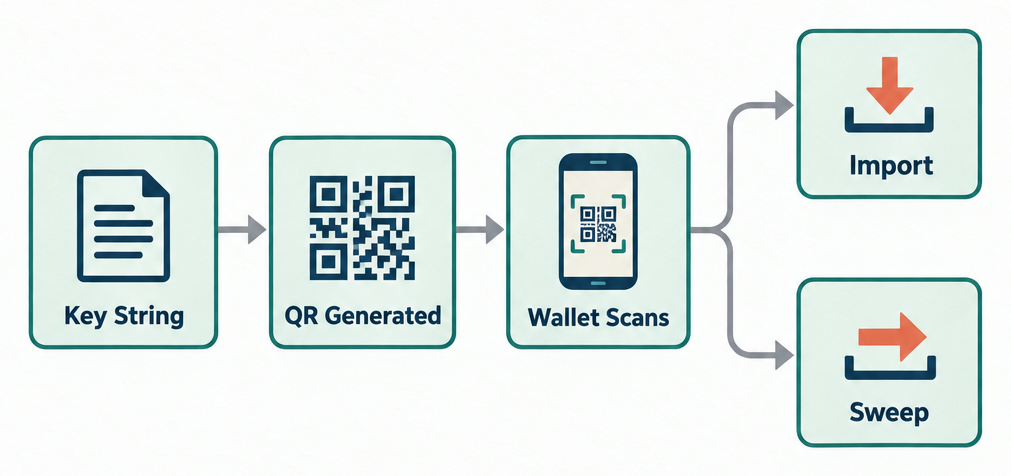
Your wallet software takes the key string and encodes it into a QR image. The image includes error correction, which is why a partly smudged code can still scan. Level H correction can recover a code with up to 30 percent of it damaged.
Another wallet scans the image, decodes the string and does one of two things.
Import adds the key to the wallet’s key list. The old paper copy still works, so two places now control the coins.
Sweep creates a transaction that moves every coin from that key to a fresh address the new wallet controls. The old key becomes empty. Sweeping is almost always the better choice, because it ends the exposure of the paper copy.
Some newer hardware wallets use QR codes in a different way. They never show the private key at all. The phone app sends an unsigned transaction as a QR code, the offline device signs it, and the device displays the signed transaction as a QR code. Keys never leave the device, and the codes being scanned are safe to show anyone.
How we ranked these seven methods
We judged each method on five things:
- Whether the private key is ever displayed in plain form
- Whether a single photo or scan can drain the wallet
- Whether the method survives fire, water and fading ink
- Whether it depends on a website, app or company still existing
- How many well-documented losses trace back to it
Methods that never reveal the key rank highest. Methods that put the raw key on a phone screen or a website rank lowest.
The 7 ways to handle private key QR codes, ranked
1. Air-gapped hardware signer that only scans transaction QR codes (top pick)
This is the safest way to use QR codes with crypto, because the private key QR code never exists.
Devices in this category stay offline for their whole life. The companion app on your phone or laptop builds a transaction and shows it as a QR code. The device scans it, shows you the destination and amount on its own screen, signs it after you confirm, and displays a signed transaction QR code. The app scans that and broadcasts it.
Larger transactions are split into animated QR codes using formats such as BC-UR or BBQr, which cycle through frames until the receiving camera has every piece.
What you gain: no USB cable, no Bluetooth, no key on any screen. A thief who photographs every QR code in the process gets nothing they can spend.
Weaknesses: the devices cost more than paper. You still have to back up the seed phrase somewhere, and that backup is a plain secret again. And some users assume the scanned codes are private and hide them, which wastes effort, or assume the seed backup is equally safe to photograph, which is dangerous.
2. BIP38 password-protected private key QR code
BIP38 is a Bitcoin standard that encrypts a private key with a passphrase. The result is a 58-character string starting with 6P. Printed as a QR code, it is useless to anyone who scans it without the passphrase.
This is the method behind most “secured” paper wallets and some sealed physical cards. The QR code can be stolen and the coins stay locked, as long as the passphrase is strong and stored separately.
Weaknesses: BIP38 is a Bitcoin-only format. Ethereum keystore files do something similar, but there is no single widely scanned QR format for them. Decrypting BIP38 is deliberately slow, and not every wallet supports it. Lose the passphrase and the coins are gone for good. A weak passphrase, such as a pet’s name, can be cracked offline at leisure once the code is photographed.
3. Seed phrase QR code kept offline for hardware wallet restores
Several open-source signing devices support SeedQR, a format that encodes a BIP39 seed phrase as a QR code. The compact version stores only the raw entropy, so a 12-word seed becomes a tiny code you can stamp on metal.
It saves you from typing 12 or 24 words into a small device. Scanning takes two seconds and avoids typos.
The catch is identical to any seed backup: the code is the wallet. Because it is small and looks like nothing, people get careless with it. Keep it where you would keep the written words, in a safe or a bank box, never in a phone gallery.
Weaknesses: only some devices read SeedQR, so check support before relying on it for recovery. Metal stamping is fiddly. A smudged compact code with no error correction margin may fail to scan when you need it most.
4. Sealed physical coins and cards with a hidden private key
Physical bitcoins have a long history. From 2011 to 2013, Casascius coins shipped with a private key printed under a tamper-evident hologram. The maker stopped after an inquiry from FinCEN, and surviving unopened coins now trade as collectibles.
Modern versions are plastic cards with a QR code address on the front and a scratch-off panel hiding the private key. Some use BIP38-style two-factor encryption, so even the manufacturer never held the complete key.
These are fine for gifts and small amounts, and they make the “coins QR code” idea tangible. They are a poor idea for real savings.
Weaknesses: you are trusting a factory. If the maker kept a copy of the keys, or an employee did, every card is exposed. Holograms and scratch panels can be lifted and replaced by a skilled thief before resale. And you cannot verify the key is unused without scratching the panel, which destroys the collectible value.
5. Plain unencrypted paper wallet from an offline generator
This was the standard advice a decade ago. You download a paper wallet generator, disconnect from the internet, open it in a browser, print the result, and clear the printer memory.
The page prints a public address QR code on one side and the private key QR code on the other. Fold it, seal it, store it.
It still works. The problems are the many ways it quietly fails.
Printers cache documents in memory, and networked office printers can keep copies for months. Inkjet ink runs if the paper gets damp. Thermal receipt paper fades to blank in a few years. Fake generator sites with lookalike names have shipped code that sends every generated key to the author.
Weaknesses: unencrypted, so one photo is total loss. Reuse is risky, since many paper wallet users send change to the same address after a partial spend. If you must use one, sweep the whole balance in a single transaction when you cash it in.
6. Private key QR code displayed on a phone or computer screen
Many software wallets have an “export private key” or “show QR” button. The intent is to let you move funds to another app by scanning across devices.
The risk is where that image goes next. Screenshots on iPhone and Android sync to iCloud or Google Photos by default. Screen recording apps, remote support tools and accessibility services can read the screen. Clipboard managers keep the string when you copy it. Malware that watches the screen for key-shaped strings is common.
If you take a screenshot of a private key QR code, assume it is now stored on a server you do not control.
Weaknesses: this method relies on the phone being clean, the room being private, and you never taking a screenshot. Hold the phone away from windows, cameras and other people, scan directly from screen to the second device, and delete nothing because there should be nothing to delete.
7. Online QR code generators and cloud printing (avoid)
Searching “private key QR code generator” returns dozens of websites that will turn any text into a QR code. People paste their key into them.
Every one of those sites can log what you paste. Even honest ones often run third-party analytics scripts that capture form fields. The same applies to printing a key through a cloud print service, emailing it to yourself, or pasting it into a notes app that syncs.
There is no safe way to do this, so it ranks last.
Quick-reference comparison
| Rank | Method | Key ever shown in plain form? | One photo drains it? | Survives fire and water? | Depends on a company? |
|---|---|---|---|---|---|
| 1 | Air-gapped transaction QR signer | No | No | Device no, seed backup varies | Partly, for firmware |
| 2 | BIP38 encrypted key QR | No, encrypted | No, needs passphrase | Paper no, metal yes | No |
| 3 | Offline SeedQR for restores | Yes | Yes | Metal yes | No |
| 4 | Sealed coin or card | Hidden until opened | Yes, once opened | Plastic partly | Yes, the maker |
| 5 | Plain paper wallet | Yes | Yes | No | No |
| 6 | Key QR on a screen | Yes | Yes | Not applicable | Yes, the OS and app |
| 7 | Online generator | Yes, to the site | Yes | Not applicable | Yes, entirely |
Real-world losses from private key QR codes
The clearest public example happened on live television. In December 2013, a Bloomberg TV anchor held a paper wallet gift up to the camera during a segment on Bitcoin. The private key QR code was visible for a few seconds. A viewer scanned it off the broadcast and swept the roughly $20 balance before the segment ended.
That amount was small. The lesson scales. The same thing happens when people post wallet photos in forums, livestream their desktop with a wallet open, or hold a paper wallet up in a video call. Automated bots scan images posted to public sites for anything that decodes to a valid key.
Scam-side losses are larger. The FBI’s Internet Crime Complaint Center recorded $9.3 billion in cryptocurrency-related fraud losses for 2024, with cryptocurrency counted as a payment method across many crime types, while investment fraud was the largest crime category by dollar amount in its annual report at $6.57 billion. A share of that involves victims who were talked into revealing keys or seed phrases to a “support agent” or a fake wallet app.
The FBI issued a public warning in January 2022 about criminals tampering with QR codes, and the FTC published a consumer alert in December 2023 on “quishing,” where a QR code sends you to a phishing page. For crypto, the twist is a code that opens a fake wallet site asking you to “verify” by entering your seed, or a wallet-connect prompt that approves a token drain.
A separate pattern: investment groups that promise to make money fast and ask new members to “link” a wallet by scanning a code. The code approves a smart contract to spend tokens from your wallet. Many of these groups are a ponzi scheme dressed up as a trading club, and the drain approval is how they collect.
Safe usage rules for any private key QR code
How to sweep a paper wallet safely
- Use a wallet app you installed from the official store or the developer’s site, never from a link in a message.
- Update the app, then put the phone in airplane mode while you scan if the app allows offline signing.
- Choose “sweep,” not “import,” so the old key is emptied.
- Scan in a private room with no windows, webcams or other phones pointed at the paper.
- Confirm the full balance arrived at your new address on a block explorer.
- Destroy the paper or mark it clearly as empty so no one reuses that address.
A few rules that apply to every method above.
Never photograph a private key QR code with a phone camera unless the camera is the wallet app itself, in scan mode. The default camera app saves a picture and often syncs it.
Never print a key through a shared or networked printer. If you print at all, use a device you own, connected by cable, and clear its memory after.
Never type or paste a key into a browser. Browser extensions can read every page.
Treat the words “scan here to secure your wallet” as a scam signal. Legitimate wallets never ask you to scan a code to prove ownership.
Keep the public address QR code and the private key QR code physically apart when you store paper. If a thief gets only the address, they see your balance but cannot touch it.
Safer options first
A hardware wallet that signs offline and shows only transaction QR codes removes the need to ever display a key.
If you hold a small amount, a reputable self-custody app with a written seed backup is simpler than a paper wallet.
For money you cannot afford to lose, remember crypto is not a savings product and carries no insurance.
Why QR codes still have real benefits for crypto
Ranking the risks does not mean the format is bad. Used correctly, QR codes solve problems that cost people money.
Typing a 42-character Ethereum address by hand produces errors. A wrong character sends funds to an address no one controls, and the transfer cannot be reversed. Scanning a wallet address QR code removes that risk entirely.
QR codes also make true air-gapping practical. Before QR-based signing, keeping a key offline meant carrying files on a USB stick, which can carry malware in both directions. A camera cannot carry a virus.
And for receiving payments, a printed or on-screen address code is faster than any other method. Merchants, tip jars and invoice systems all rely on it. The security problem only begins when the code contains a key instead of an address.
US rules and taxes that touch private key QR codes
No federal law regulates how you store your own private keys. Self-custody is legal in every state. The rules that matter are about taxes and about what happens when keys are stolen or lost.
Under IRS Notice 2014-21, the IRS treats cryptocurrency as property. Every sale, trade or purchase with crypto is a taxable event, and you report gains and losses on Form 8949 and Schedule D. Form 1040 also asks every filer a yes-or-no digital asset question.
Moving coins from a paper wallet to a hardware wallet you control is not a sale. The IRS’s own digital asset FAQ confirms that transfers between wallets you own are not taxable. Sweeping a paper wallet triggers a network fee, which is not a deductible expense for most individual holders, but the sweep itself creates no gain or loss.
Keep records anyway. When you later sell, you need the original purchase date and cost basis. A paper wallet made in 2017 with no notes is a tax headache in 2026. Write the acquisition date and price on a separate sheet, not on the key itself.
Starting with transactions in 2025, exchanges and other brokers report sales to the IRS on Form 1099-DA. Self-custody wallets are not brokers, so coins you hold on paper generate no reports until you sell through a platform.
Losing a key is painful at tax time too. Since the Tax Cuts and Jobs Act, personal casualty and theft losses are deductible only in federally declared disaster areas through 2025, and the IRS has said in chief counsel memos that simply losing access to worthless or inaccessible crypto does not create a deductible abandonment loss for an individual. The IRS issued narrower guidance in 2025 suggesting some victims of profit-motivated scams may qualify for a theft loss. That is a question for a tax professional, not a rule you can assume.
Where to report a stolen key
If someone drains a wallet after scanning your code, report it to the FBI’s Internet Crime Complaint Center at IC3 and to the FTC through ReportFraud. If an exchange or app was involved, file a complaint with the CFPB. Recovery is rare, because transactions are final, but reports feed investigations and occasionally lead to frozen funds at an exchange.
Be aware that “recovery services” that contact you after a theft are usually a second scam. No legitimate service can reverse a blockchain transaction.
Selection checklist before you use any private key QR code method
Answer these honestly before you choose.
- Does the method ever show the key in plain form? If yes, where exactly will that image exist?
- Who made the generator, device or card, and is the code open for review?
- What happens if the paper burns or the company closes?
- Have you tested a recovery with a tiny amount first?
- Is the amount small enough that total loss would not change your month?
If any answer makes you uneasy, pick a method higher on the list, or hold less in that wallet.
FAQ
Is a private key QR code the same as a wallet address QR code?
No. The address code is public and safe to share, since it only lets people send you coins. The private key code lets anyone spend your coins. Wallets usually label them, but the two look identical as images.
Can someone steal my crypto just by seeing a private key QR code?
Yes. Anyone who scans or photographs the code and decodes it has full control. The 2013 Bloomberg TV incident proved it takes seconds. There is no second step, password or confirmation unless the key is encrypted with something like BIP38.
What if my paper private key QR code gets smudged or torn?
QR codes include error correction, and the highest level recovers up to 30 percent damage. Most wallet apps will also accept the printed text key below the code. If both are unreadable, the coins are lost. That is why a second copy, stored separately, matters.
Should I import or sweep a private key?
Sweep. Sweeping moves all the funds to a new address in your wallet and leaves the old key empty. Importing keeps the old key live, so the paper copy still controls the coins and anyone who finds it later can spend them.
Is it safe to keep a screenshot of my private key QR code?
No. Screenshots sync to cloud photo services by default on most phones, and malware can read the gallery. If you already took one, move the funds to a new wallet and delete the image from every device and cloud account.
Do I owe taxes when I scan a paper wallet into a new app?
Not if both wallets are yours. The IRS treats transfers between your own wallets as non-taxable. You owe tax when you sell, trade or spend the coins, based on your original cost basis. Keep the purchase date and price with your records.
Are private key QR codes insured if they are stolen?
No. FDIC insurance covers bank deposits and SIPC covers brokerage accounts in certain failures. Neither covers cryptocurrency held in your own wallet, and crypto can lose all of its value on its own.
Laws and regulations referenced
- IRS Notice 2014-21 (virtual currency is property)
- IRS Form 1099-DA, Digital Asset Proceeds From Broker Transactions
- IRS Form 8949, Sales and Other Dispositions of Capital Assets
- IRS Schedule D (Form 1040), Capital Gains and Losses
- FDIC deposit insurance
Links go to the official text on government sites.
Check, verify or complain
Sources
- irs.gov › forms pubs › about form 1099 da irs.gov · primary source
- irs.gov › individuals › international taxpayers › frequently asked questions on vir… irs.gov · primary source
- ic3.gov%20(psa%20i-011822);%20https › www.pymnts.com › cybersecurity › 2023 › ftc warns consumers about scammers … ic3.gov%20(psa%20i-011822);%20https
- cdn.standards.iteh.ai › samples › 83389 › dee29007cb62437f9767323e6af02f90 › ISO IEC 18004 2024.pdf cdn.standards.iteh.ai

Owen explains how crypto works for US readers: coins and tokens, buying and selling, wallets and self-custody, staking and DeFi. He sticks to how things work and what they cost, never price calls, and checks platform fees and licensing against the companies' own disclosures.

Ruth is US Financer's standards editor. Every article goes through her checks before and after it is published: each rate, fee, cap, deadline and rule is matched against its primary source, every law named is linked to its official text, and anything that cannot be…
Comments are closed